
MATs
Reputation management
Centralisation
.webp?width=800&height=534&name=accessible-school-websites%20(1).webp)

Almost all school websites have major accessibility problems.
That's according to a Government Digital Service report, which analysed over 1000 public sector websites and apps.
For schools, that represents a problem: because accessibility is no longer just a "nice to have" for school websites.
A school's website is one of the first places Ofsted looks when preparing a report - and it's where prospective parents look too.
School website accessibility compliance is not optional.
While schools do have partial exemptions from public sector accessibility standards for "primary purpose" content (such as teaching materials or PDFs for pupils), state-funded schools are expected to have websites that meet WCAG 2.2 (AA) standards. This includes Multi-Academy Trusts (MATs) and academies.
But it's more than a legal requirement. An accessible website is one of the quickest and most powerful ways a school can showcase its commitment to diversity, inclusion and equal treatment for all.
The best way to judge how accessible a website is by using the Web Accessibility Guidelines (WCAG) - the same standards the DfE recommends schools follow.
However, meeting those standards means being aware of a multitude of different details, including text colour and size, mobile usability, navigation readability and more.
That does not mean that checking your school's website is accessible is impossible. In fact, some of the most common mistakes are ones that are easy to check for.
Inaccessible colour contrast is a common problem, with many school websites failing to meet a minimum contrast ratio. But this is an issue that the DfE specifically provides resources and tools for.
WCAG accessibility standards mandate that there must be at least a 4.5:1 contrast ratio for normal text and 3.1 ratio for large text, ensuring that the text is readable for people with visual impairments. In practice, this means that if your website's background is dark, your text must be light enough to still be readable - and vice versa for light backgrounds and dark text.
This sounds simple enough, but in practice the margin between "acceptable" and "unacceptable" can be very small.
Here's an example: here we have five blocks with very similar values for the background and text colour. Which of these would pass WCAG's accessibility tests and which would fail?
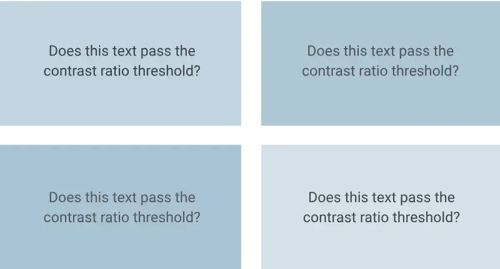 Depending on the person and their own vision, all of these blocks might be easily readable. However, what makes the WCAG standards such a reliable benchmark is that there is no subjectivity involved. A website can either pass or fail... and in this case, two of these blocks fail:
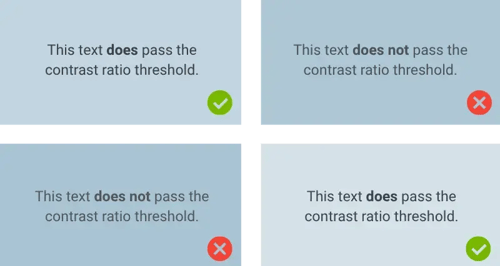 As you can see, the difference is not always as obvious as you might think. In fact, 77.3 per cent of all public sector websites, including school websites, failed WCAG's minimum standards for colour contrast ratios (Accessibility monitoring of public sector websites and mobile apps, 2024).
Meanwhile, a lack of focus visibility was close behind contrast ratios as the most common issue, with 76 per cent of websites failing checks.
What is focus visibility, and why does a school website need it?
A website is focus visible when you can clearly see where you are on a page when navigating without a mouse. That means when you press tab, your browser moves through links, buttons and form fields, and the currently selected element (such as a button) will have a visible outline, highlight or underline to make it clear it's selected.
When focus isn't visible, the site becomes confusing and difficult to use for keyboard-only users, screen reader users and people with motor impairments.
As with focus visibility, websites which cannot be navigated and controlled with a keyboard are inaccessible to a wide variety of people.
This means that menus, buttons and any custom user interface (such as dropdown menus) must be able to be selected using only a keyboard. Without this functionality, a website can be functionally unusable for someone who uses their keyboard to navigate.
Like contrast ratios and focus visibility, this was a common problem, with 73 per cent of websites failing.
School websites can no longer afford to be outdated, inaccessible or incomplete. As a school's shop window, websites form a large part of a school's first impression.
And if you're wondering what Ofsted looks for when reviewing school websites, look no further. From accessibility standards to necessary content, we comb through the essentials.